

Looker Studio
Looker Studio / Data Studio Agency
Dashboards built in Looker Studio, formerly Google Data Studio, for teams that want everyone to see the numbers.
Get a free proposal
Tell us what you need. A consultant replies within one working day.
01
Looker Studio (Data Studio) dashboards
A Looker Studio dashboard is an interactive report built in Google's free reporting tool that pulls live data from sources such as GA4, Google Ads, Google Sheets and BigQuery into charts, tables and filters, refreshes on its own, and can be shared with anyone through a link.
On 11 April 2026 Google renamed Looker Studio back to Data Studio, the name it carried until October 2022, and Looker Studio Pro became Data Studio Pro; existing reports, data sources and links moved across with no action needed, and Looker, Google's separate enterprise BI platform, did not change.
Most people still search for "Looker Studio dashboard", so this page uses both names. Everything here applies to the product whichever name is on the login screen. Below: what a good dashboard needs, the main dashboard types, real examples we have built, templates, connectors and BigQuery, Data Studio Pro, how it compares with Looker and Power BI, and what it costs.
02
What a good Looker Studio dashboard needs
A data model before a single chart
Decide which tables feed the report, how they join, and what grain each one is at (one row per day, per order, per campaign). Most broken dashboards break here.
- One data source per subject, reused across pages
- Joins done upstream where possible, not in ten blends
- Field names a business reader recognises
KPIs that are defined in writing
Revenue, conversions, leads and margin mean different things to marketing, sales and finance. Write the formula for each headline number, agree it, then build it once as a calculated field.
- Eight to twelve headline numbers, not forty
- Each KPI with a target or a comparison period
- A definitions page inside the report
Filters people actually use
A date range control, plus the two or three dimensions readers slice by every week, such as channel, region or product line. Too many controls and nobody trusts which ones are set.
- Default date range that matches the meeting cadence
- Filters scoped to the right pages
- Drill-down instead of duplicate pages
Performance that survives real data
A report that takes twenty seconds to load stops being opened. Speed comes from the data source: extracts, pre-aggregated tables in BigQuery, fewer charts per page and sensible data freshness settings.
- Under ten or so charts on the busiest page
- Aggregated tables for anything over a few million rows
- Caching set to how often the data really changes
03
Types of Looker Studio dashboard and what each shows
Marketing dashboard
Spend, clicks, conversions and cost per result across paid and organic channels on one page, so a budget conversation starts from the same numbers.
- Spend and cost per acquisition by channel
- Google Ads, Meta, LinkedIn and Search Console together
- Month on month and year on year in one chart
GA4 dashboard
Traffic, engagement and key events from Google Analytics 4 in a form people outside the analytics team can read, without opening the GA4 interface.
- Sessions and users by channel group and landing page
- Key events and conversion rate by source
- Engagement rate and top content
Google Ads dashboard
Campaign, ad group and keyword performance with search terms and budget pacing, built for the weekly optimisation call rather than the monthly recap.
- Cost, conversions, CPA and ROAS by campaign
- Impression share and lost budget
- Pacing against monthly budget
Sales and CRM dashboard
Pipeline, win rate and sales cycle from HubSpot, Salesforce or a CRM export, tied back to the marketing source that created each deal.
- Pipeline by stage and owner
- Win rate and average deal size
- Leads to revenue by original source
Ecommerce dashboard
Orders, revenue, average order value, returns and repeat purchase from Shopify, WooCommerce or a marketplace, set against the ad spend that drove them.
- Revenue and margin by product and channel
- New against returning customers
- Cohort retention by first order month
Finance dashboard
Revenue, costs, cash and budget variance from the accounting system or a finance warehouse, with the actual-against-budget view a monthly close needs.
- Actual, budget and forecast by cost centre
- Gross margin trend
- Receivables ageing
Operations dashboard
Throughput, backlog, turnaround time and exceptions from operational systems, refreshed often enough that the team runs the day from it.
- Volume and cycle time against target
- Exceptions and delays, ranked
- Capacity and utilisation
Executive dashboard
The handful of numbers leadership asks about, on one page a board can read in two minutes, with drill-through to the detail behind each one.
- Company KPIs against target
- Trend and variance, not just actuals
- Links into each functional dashboard
Below are dashboards we have built in Looker Studio for clients in retail, pharma, manufacturing, logistics and insurance. Each was built against the client's own data rather than a demo set, so the screenshots show the layouts and controls as delivered: date range pickers, filter bars, scorecards and paged tables. Client names and confidential figures are not shown. If you want a sense of what a business dashboard can look like across tools, our business performance dashboard service and WolfSight pages cover the same ground in more general terms.
04
Looker Studio dashboard examples
Retail and ecommerce performance
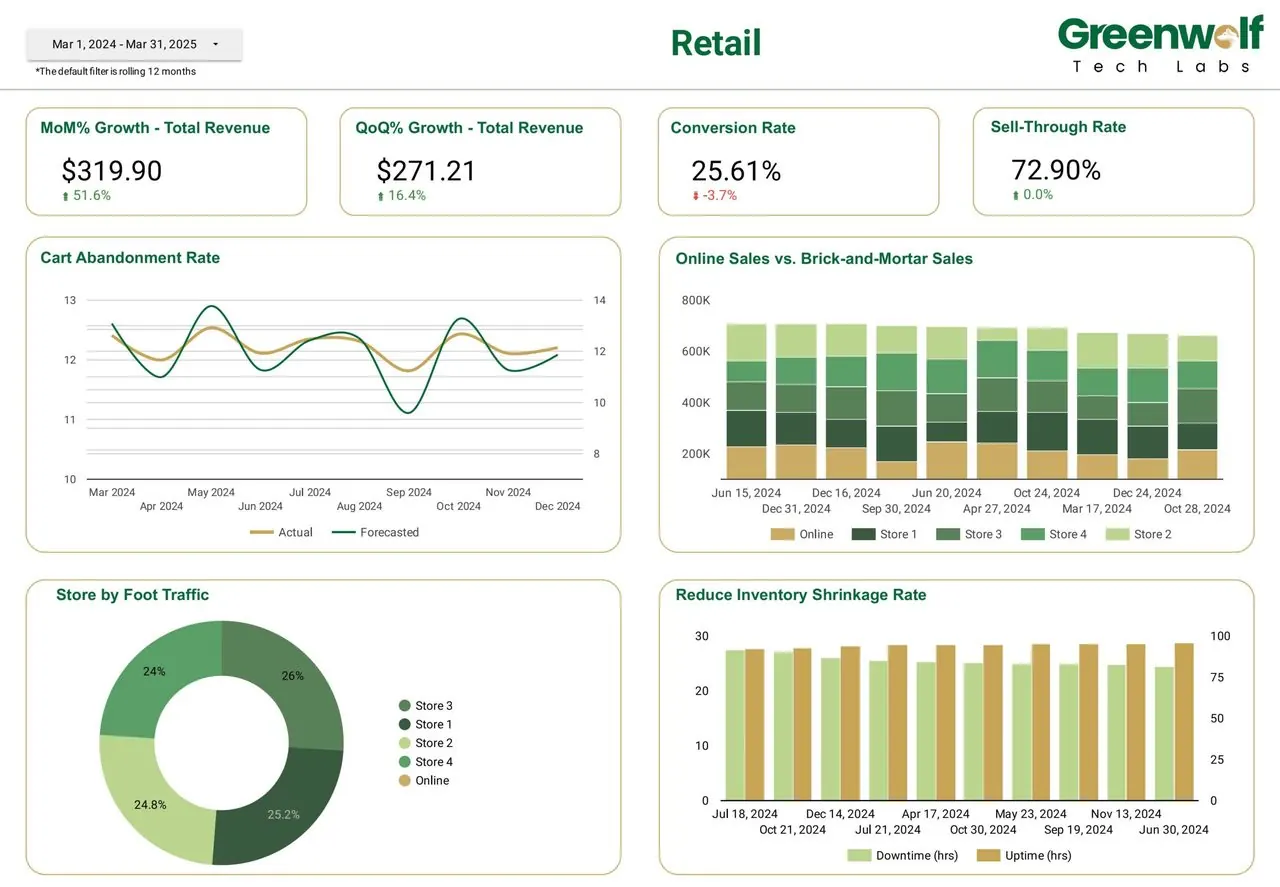
Online and in-store sales on one page, with the conversion and sell-through numbers a trading meeting actually argues about. Ad platforms report the revenue they think they caused; this report reconciles it to orders.
- Online against brick-and-mortar revenue, store by store
- Cart abandonment tracked against forecast
- Foot traffic and inventory shrinkage beside sales
Brand performance for a pharma team
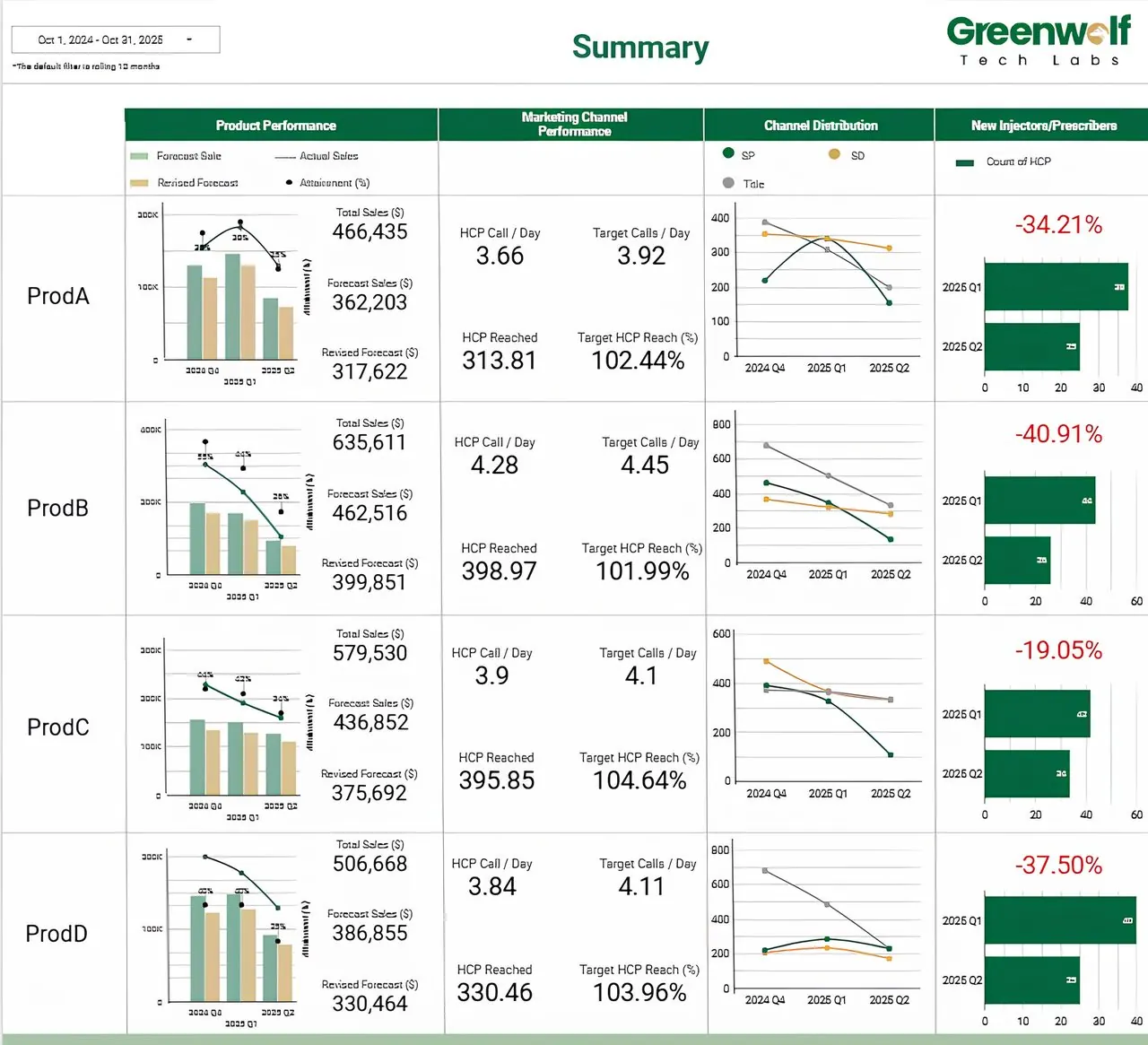
Four products, forecast against actual, joined to field activity and channel distribution, so a brand lead can see which product is behind plan and whether the field or the channel explains it.
- Actual, forecast and revised forecast per product
- HCP calls per day and reach against target
- New prescribers by quarter, with the change called out
Row-level access by team and territory, with every metric traceable to its definition.
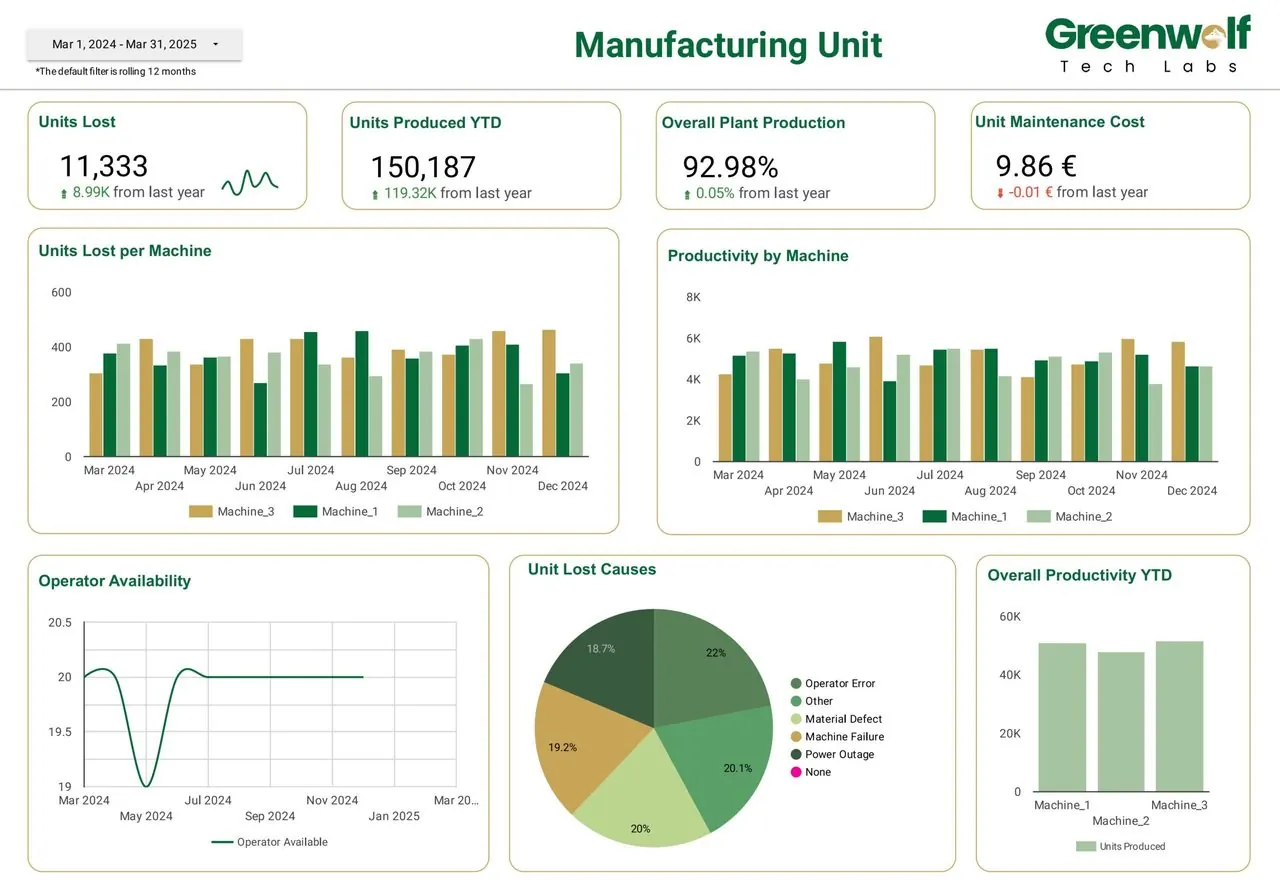
Manufacturing output and downtime
Production, quality and downtime from systems that were never designed to be read together, put on one page for the people running the week.
- Throughput against plan by line
- Loss and downtime reasons, ranked
- Exception views instead of wall-to-wall charts
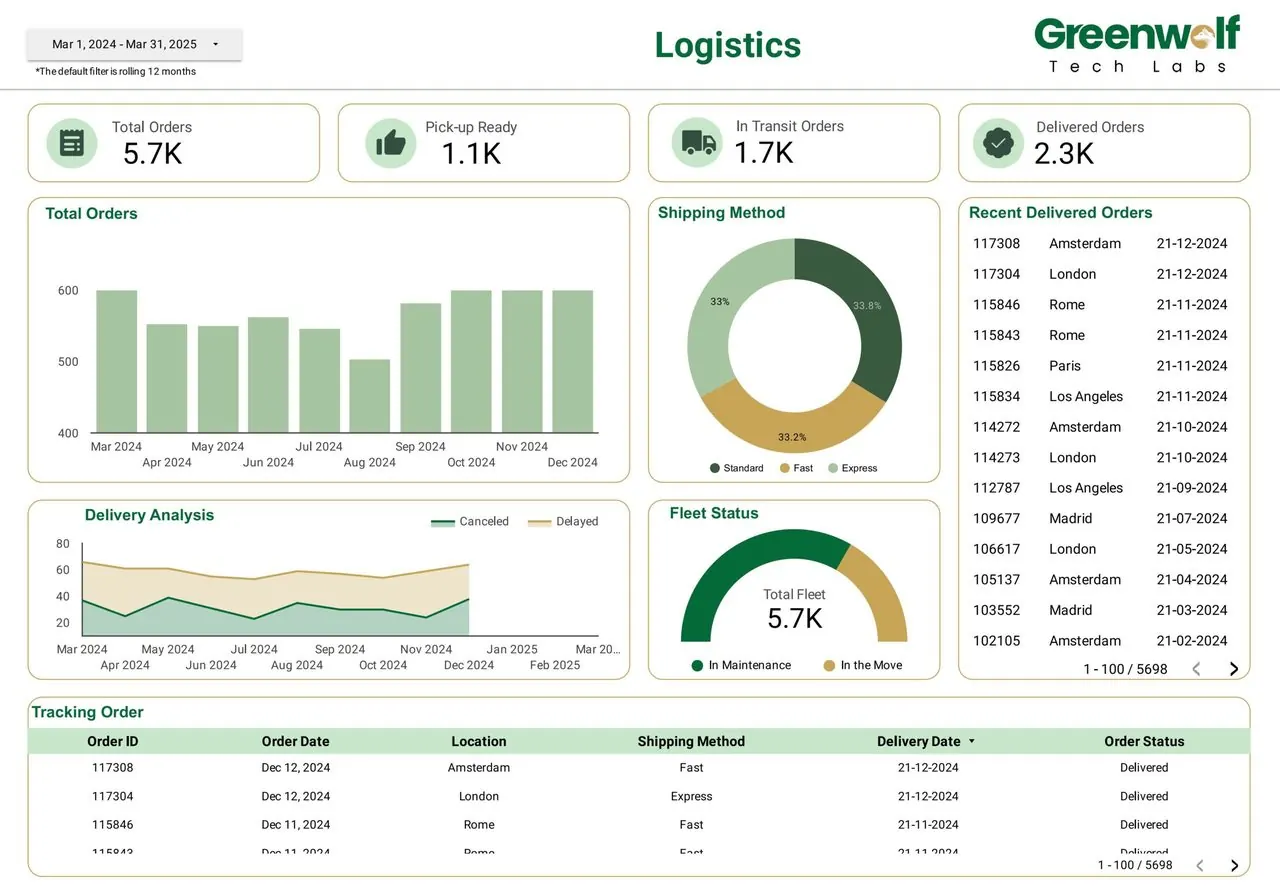
Order tracking from pickup to delivery
Every order's status in one view, joined from the order system and the carriers, so operations answers "where is it?" without opening three portals.
- Orders by stage: pickup ready, in transit, delivered
- Cancellations and delays over time
- Fleet status and shipping method mix
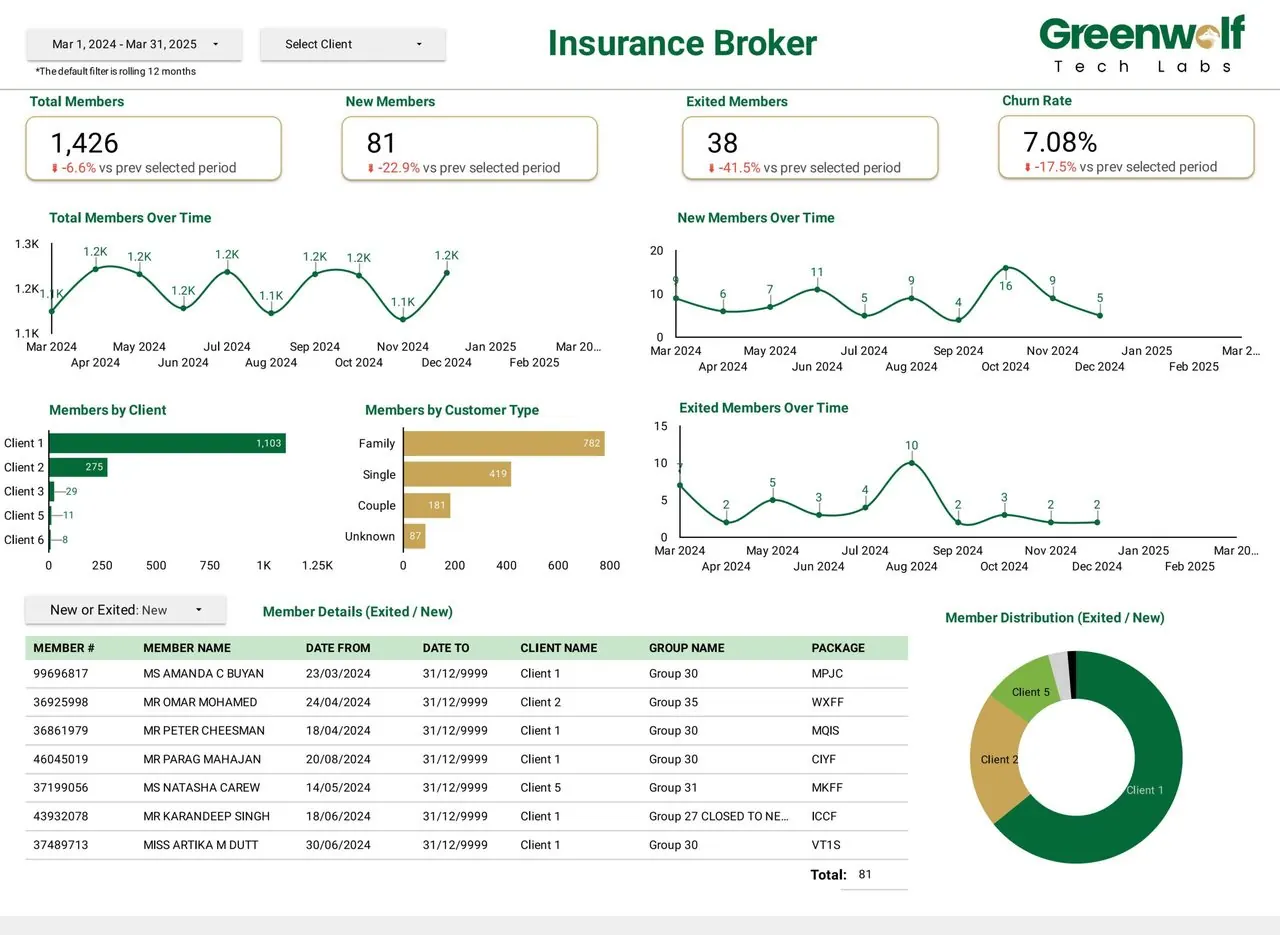
Membership and churn for an insurance broker
Members joined, lost and retained per client scheme, refreshed from the policy administration export instead of rebuilt in a spreadsheet every month.
- New and exited members against the prior period
- Churn rate by client and customer type
- A filterable member list behind every chart
05
Looker Studio templates vs a custom build
Templates are a good start and often all a small team needs. Google publishes a template gallery inside the product, and connector vendors and the community publish many more, including GA4 dashboard and Google Ads Looker Studio templates. You copy the template, point it at your own data source, and the charts fill in.
A template is usually enough when:
- Your data comes from one source with a native connector, such as GA4, Google Ads or Search Console.
- The standard metrics are the ones you report on, with no custom definitions.
- One person reads the report and knows the platform it came from.
A template starts to fail when:
- You need several sources in one view, for example ad spend from four platforms against CRM revenue. Templates assume one source per chart.
- Your KPIs have business definitions: qualified leads, contribution margin, net revenue after refunds.
- The data is large enough that live connections time out or hit API quotas, which GA4 reports with many charts often do.
- The report goes to a client, a board or several teams and has to reconcile to another system.
- You need access control by region, client or team.
A custom build starts from the questions the report must answer and the data model behind them. Many of our builds keep a template's layout and replace everything underneath it.
06
Looker Studio connectors and data sources
A connector is the pipe between a report and the data. Looker Studio connectors fall into three groups, and which one you use decides cost, speed and reliability more than any chart setting. The list below reflects Google's connector catalogue as of October 2026.
| Connector type | Examples | Cost | Watch out for |
|---|---|---|---|
| Google connectors (built by Google) | Google Analytics (GA4), Google Ads, Search Console, Google Sheets, BigQuery, Cloud SQL for MySQL, Spanner, Cloud Storage, MySQL, PostgreSQL, Microsoft SQL Server, Amazon Redshift, Microsoft Excel, CSV upload, Campaign Manager 360, Display & Video 360, Search Ads 360, Google Ad Manager 360, YouTube Analytics, Looker | No charge for the connector; the database or warehouse behind it may bill for queries | GA4 API quotas on busy reports; live database connections are only as fast as the database |
| Partner (community) connectors | Meta Ads, LinkedIn Ads, TikTok Ads, Microsoft Ads, Shopify, HubSpot, Salesforce, Snowflake and hundreds more from third-party vendors | Usually a monthly subscription from the vendor, priced by connector, account or data volume | Each vendor sets its own refresh limits and pricing; the data passes through their servers |
| BigQuery as a hub | Any source loaded into BigQuery by a pipeline or ETL tool, then read with the native BigQuery connector | BigQuery storage and query charges, plus the pipeline tool | Needs someone to model the tables; pays off once data is large or comes from many sources |
Google's product page cites over 1,300 community connectors (checked October 2026). There is also an extract data option that stores a snapshot of up to 100 MB on Google's side and refreshes on a schedule, which is a quick way to speed up a slow report. Snowflake is not in Google's own connector list, so it connects through a partner connector or by moving data into BigQuery; our Snowflake consulting page covers that side.
07
Looker Studio and BigQuery
Looker Studio can connect to BigQuery natively, and for anything beyond a few sources or a few million rows this is the setup we recommend. Instead of blending data in the report, you load each source into BigQuery, model it into clean reporting tables with SQL, and point the dashboard at those tables. The report then does very little work, so it loads fast and every page agrees with every other page.
What it costs: BigQuery on-demand queries are billed per TiB of data processed, with the first 1 TiB each month free per billing account; Google's list price in US regions was $6.25 per TiB beyond that as of October 2026, and storage is billed separately. A dashboard reading small, partitioned reporting tables rarely gets near the free allowance; one running live queries over raw event tables can.
The pieces we usually put in place:
- Pipelines that load ad platforms, CRM and ecommerce data into BigQuery on a schedule (see our ETL service).
- Partitioned and clustered tables, so a query for last month does not scan five years.
- Scheduled queries or materialised tables that pre-aggregate to the grain the dashboard needs.
- BI Engine, Google's in-memory layer for BigQuery, when a report needs sub-second response for many concurrent users.
- Row-level access by client, region or team where readers must only see their own data.
If the bigger problem is that your data is scattered and inconsistent before it ever reaches a dashboard, start with data management rather than reporting.
08
Performance and data blending tips
Blend less, model more
A blend joins up to five data sources inside one report, and it lives only in that report. For one or two charts that is fine; for a whole dashboard, join the data upstream in BigQuery or a sheet and connect the result once.
Check the join keys
Blends join on matching dimensions. Dates in different time zones, campaign names typed differently in two platforms and missing rows on one side are the usual causes of numbers that do not add up.
Set data freshness on purpose
Most connectors cache results for a set period. Ad data reported once a day does not need fifteen-minute freshness, and longer caching means faster pages and fewer quota errors.
Use extracts for slow sources
An extracted data source is a snapshot of up to 100 MB that refreshes on a schedule. It is the fastest fix for a slow Sheets or GA4 report that does not need live data.
Fewer charts per page
Every chart is at least one query. Split a crowded page into an overview and drill-down pages.
Watch GA4 quotas
The GA4 connector is subject to Google Analytics API quotas. Reports with many charts and many viewers can hit them; exporting GA4 to BigQuery removes the problem for heavy reporting.
09
Data Studio Pro (formerly Looker Studio Pro) vs free
Data Studio Pro is the paid edition of Data Studio, called Looker Studio Pro until April 2026. It keeps every free feature and adds team ownership, administration, security controls and support. The table reflects Google's documentation and pricing page as checked in October 2026.
| Feature | Data Studio (free) | Data Studio Pro |
|---|---|---|
| Price | No charge for creators or viewers | $9 per user per project per month list price; Google notes the per-user rate varies with subscription length |
| Who needs a licence | Nobody | Only people who create, edit or manage Pro content; viewers need sharing permission, not a licence |
| Content ownership | Reports belong to the individual who made them | Reports and data sources belong to the organisation, linked to a Google Cloud project, so they survive a leaver |
| Team workspaces | No | Yes, with Manager, Content Manager and Contributor roles |
| Scheduled delivery | Email PDF schedules | Up to 200 schedules per report, delivery to Google Chat, send now, pause, and chart alerts |
| Personal report links | No | Yes: each viewer gets an editable copy without changing the original |
| Security and compliance | Standard Google account controls | Customer-managed encryption keys, customer-managed storage, data residency |
| Gemini assistance | Not listed as included | Ask questions of the data, write calculated fields from prompts, add content to Slides |
| Support | Help centre and community | Google Cloud Customer Care, which also needs a Google Cloud support plan |
| Trial | Not applicable | 30 days at no cost, then billing starts automatically |
Google's documentation also states that eligible Looker customers receive at least 1,000 complimentary Pro licences, with exclusions for Looker contracts and instances created after 1 August 2026. For most small and mid-sized teams the free edition is enough. Pro earns its cost when reports must outlive the person who built them, when you send many scheduled reports, or when security review asks about encryption keys and data residency.
10
Looker Studio vs Looker vs Power BI
Looker Studio and Looker share a history but are different products, and Power BI is the tool Looker Studio is most often compared with. A summary based on each vendor's pricing pages as checked in October 2026:
| Looker Studio (Data Studio) | Looker | Power BI | |
|---|---|---|---|
| What it is | Self-service reporting and dashboards in the browser | Google Cloud's enterprise BI platform built on a governed semantic model | Microsoft's BI platform, part of Microsoft Fabric |
| List price | Free; Pro $9 per user per project per month | Custom quote on an annual contract; a platform includes ten standard and two developer users | Pro $14 per user per month and Premium Per User $24, both paid yearly; free tier for personal use |
| Viewers | Free, including viewers of Pro reports | Licensed users | Viewers generally need a Pro licence unless content sits on a Fabric capacity |
| Data modelling | Calculated fields per data source and blends of up to five sources; no shared semantic layer | LookML: one governed definition of every metric | Power Query and DAX semantic models |
| Strongest fit | Google marketing data, Sheets and BigQuery; reports shared widely | Large organisations that need governed metrics on a cloud warehouse | Organisations on Microsoft 365, Excel, Dynamics and Azure |
| Authoring | Browser only | Browser, with LookML in a development mode | Power BI Desktop for Windows plus the web service |
Looker Studio vs Power BI, in short: pick Looker Studio when the data is mostly Google, the budget for licences is small and many people need to read the report; pick Power BI when the company runs on Microsoft, the models are complex and the readers are a defined licensed group. Data Studio vs Power BI is the same comparison under the new name. We build in both, so we have no reason to push one; see our Power BI consulting and Tableau consulting pages for those tools.
Looker Studio vs Looker: Looker is for organisations that want one governed definition of every metric across many teams and are prepared to license and maintain it. Looker Studio can read Looker models through its Looker connector, so the two often run side by side.
11
Looker Studio pricing: what a dashboard really costs
Looker Studio pricing has four parts, and only one of them is the tool itself.
| Cost | What you pay (as of October 2026) | When it applies |
|---|---|---|
| Data Studio (free) | Nothing, for any number of creators and viewers | Always available |
| Data Studio Pro | $9 per licensed user per project per month list price | Only if you need team ownership, Pro scheduling, CMEK or Cloud support |
| Partner connectors | A monthly subscription set by each vendor | When data comes from non-Google platforms such as Meta, LinkedIn or Shopify |
| BigQuery | First 1 TiB of queries a month free, then per TiB processed, plus storage | When data is loaded into a warehouse for modelling |
| The build | Quoted per project | Design, data modelling, reconciliation and handover |
How we price a build. We do not publish a rate card, because the number depends on things we can only see in your data: how many sources, whether they need modelling in BigQuery first, how many KPIs need agreed definitions, how many pages and audiences, and whether access must be restricted by team or client. A single dashboard on one clean native source is a small piece of work; a multi-source report on a modelled warehouse is mostly data engineering. We scope it on a call, then give you a fixed quote and a list of any third-party costs, such as connectors or BigQuery, before anything starts.
12
How a Looker Studio dashboard build runs
Decide what the dashboard is for
One call. Which decisions this has to support, who reads it, and how often. A dashboard that serves everyone serves nobody, so we agree the scope before touching data.
Model the data
Sources connected, fields mapped, definitions agreed in writing, and BigQuery tables built where the data needs them. This is where most dashboard projects quietly fail: two teams meaning different things by revenue.
Build and review
A working draft against your real data, early, so you are reacting to something concrete rather than a wireframe. Two rounds of changes are normal.
Reconcile the numbers
Every headline figure checked against the source system it came from. If the dashboard and the finance export disagree, the dashboard does not ship.
Hand it over
You own the report, the data sources and the documentation, all in your own Google account. A recorded walkthrough for the team, and the option of ongoing support if you would rather we kept it running.
13
White label reporting in Looker Studio
Looker Studio is widely used for white label reporting because viewers pay nothing and reports can carry your logo, colours and domain links rather than Google's branding on the page. The pattern that scales is one master template per service line, connected to a data source that switches by client, with sharing set so each client sees only their own report. Adding a client then becomes a data source change, not a rebuild.
Settle early who owns the reports (the builder on the free edition, the organisation on Pro), how client data is separated in a shared BigQuery dataset, and how partner connector costs grow with each client account.
14
Want someone to run your reporting?
This page is about the dashboards themselves. If you are looking for a team to run your reporting end to end, including white label reporting and industry dashboards, our dedicated Data Studio agency site covers that in depth. If you would rather work one to one with Harsh, who leads this practice, he takes projects directly as a Data Studio consultant.
15
Looker Studio dashboard questions
How do I create a Looker Studio dashboard?
Is Looker Studio free?
What is Data Studio Pro?
Is Looker Studio the same as Data Studio or Looker?
Looker Studio vs Power BI: which should I use?
Can Looker Studio connect to BigQuery?
Where can I find Looker Studio templates?
How do I build a GA4 dashboard in Looker Studio?
Tell us what the dashboard has to answer
Send us the question your team keeps asking and where the data currently lives. We will come back with what it would take to put it on one page, what it would cost to run, and whether Looker Studio is the right tool for it.
A reply from the person who will build it, usually within one working day.
Part of our KPI Dashboards and BI hub. Start with our KPI dashboard development.
KPI Dashboards and BI
More on KPI dashboard development
Power BI Consulting and Dashboard Development
Power BI consulting services: data models, DAX, dashboards, row-level security and migration from Excel or other BI tools, delivered by experienced consultants.
WolfSight
Why Your Business Needs a Dashboard How Businesses Like Yours Use Our Dashboards to Drive Results What Makes Our Dashboards a Growth Engine Enhanced Decision-Making Turn fragmented data into...
Case Study - Automation & Dashboard
Metric Before After Time to generate reports 4-5 hours < 5 minutes Reporting accuracy 75% 99% Visibility across insurers Limited Real-time with filters Impact Overview Faster, Smarter Decision...
BI Dashboard for Sustainability & ESG Reporting
BI Dashboard for Sustainability & ESG Reporting Sustainability Reporting Needs More Than Spreadsheets As ESG disclosures become mandatory in many industries, teams can no longer rely on siloed...
BI Dashboard for Supply Chain & Supplier Performance
BI Dashboard for Supply Chain & Supplier Performance Procurement and Supply Chain Need More Than Spend Reports Most supply chain teams track spend, but that’s just the surface. Real...