


Nuclear Project Scheduling Software for New Build, SMR and Outage Work
Nuclear project scheduling software for new build, SMR and outages: critical path, float, multi-project resources and earned value. Try the WolfAtom demo.
Get a free proposal
Tell us what you need. A consultant replies within one working day.
01
What is nuclear project scheduling software?
Nuclear project scheduling software plans and controls the work on a nuclear project: new build, small modular reactor (SMR) deployment, refuelling outages, major modifications and decommissioning. It links every activity to the work that must come first, calculates the critical path and float with the critical path method (CPM), and shows what a late permit, a late reactor vessel or a delayed inspection does to the finish date.
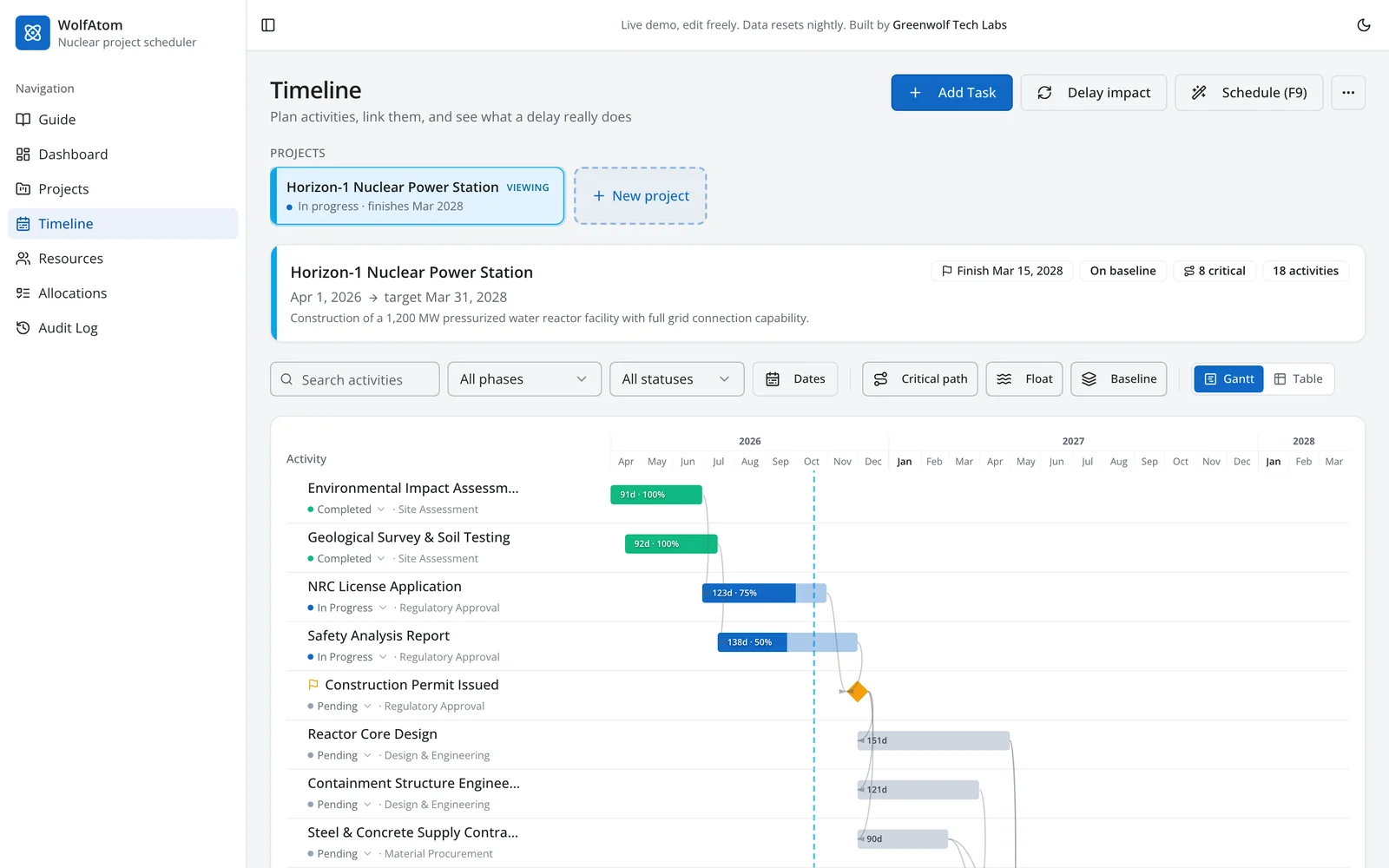
Greenwolf Tech Labs builds this kind of software for owners, EPC contractors and suppliers. Our working product demo, WolfAtom, is loaded with a fictional 1,200 MW pressurised water reactor project: 18 linked activities from site assessment to commercial operation, two milestones and an eight-person engineering team with rates and monthly hours. It runs in the browser, you can edit anything, and it resets every night.
Open the WolfAtom live demo or read on for what it does and where it fits next to Primavera P6.
02
Why nuclear schedules are harder than most
A nuclear schedule uses the same logic as any engineering project, but the cost of getting it wrong is higher and the constraints are tighter:
- Regulatory milestones. Submissions, safety analysis and permits sit on the critical path, and their timelines are not yours to compress.
- Long-lead, single-source equipment. Reactor vessels, steam generators, large forgings and fuel are made by a handful of suppliers. A slip at the forge moves the whole project, which is why procurement belongs in the schedule, not in a separate spreadsheet. Our nuclear supplier identification work exists for the same reason.
- Inspection and review gates. Witness points and document reviews add activities that general construction schedules leave out.
- Fixed outage windows. In a refuelling outage every day offline is lost generation. The US Energy Information Administration reported that US refuelling outages averaged 34 days in 2024 (to the end of July), down from 38 days in 2023. Shaving days depends on knowing exactly which jobs drive the finish.
- Scarce specialists across several jobs. The same senior engineers are often booked on new build, outages and modifications at once. Clashes stay hidden until the schedules are looked at together.
03
What WolfAtom does
Live Gantt and table
Every activity with dates, duration, percent complete, logic links and milestones. Switch between Gantt and table, filter by phase, status or dates, and add sub-tasks.
- Finish-to-start logic links
- Milestones and percent complete
Critical path and total float
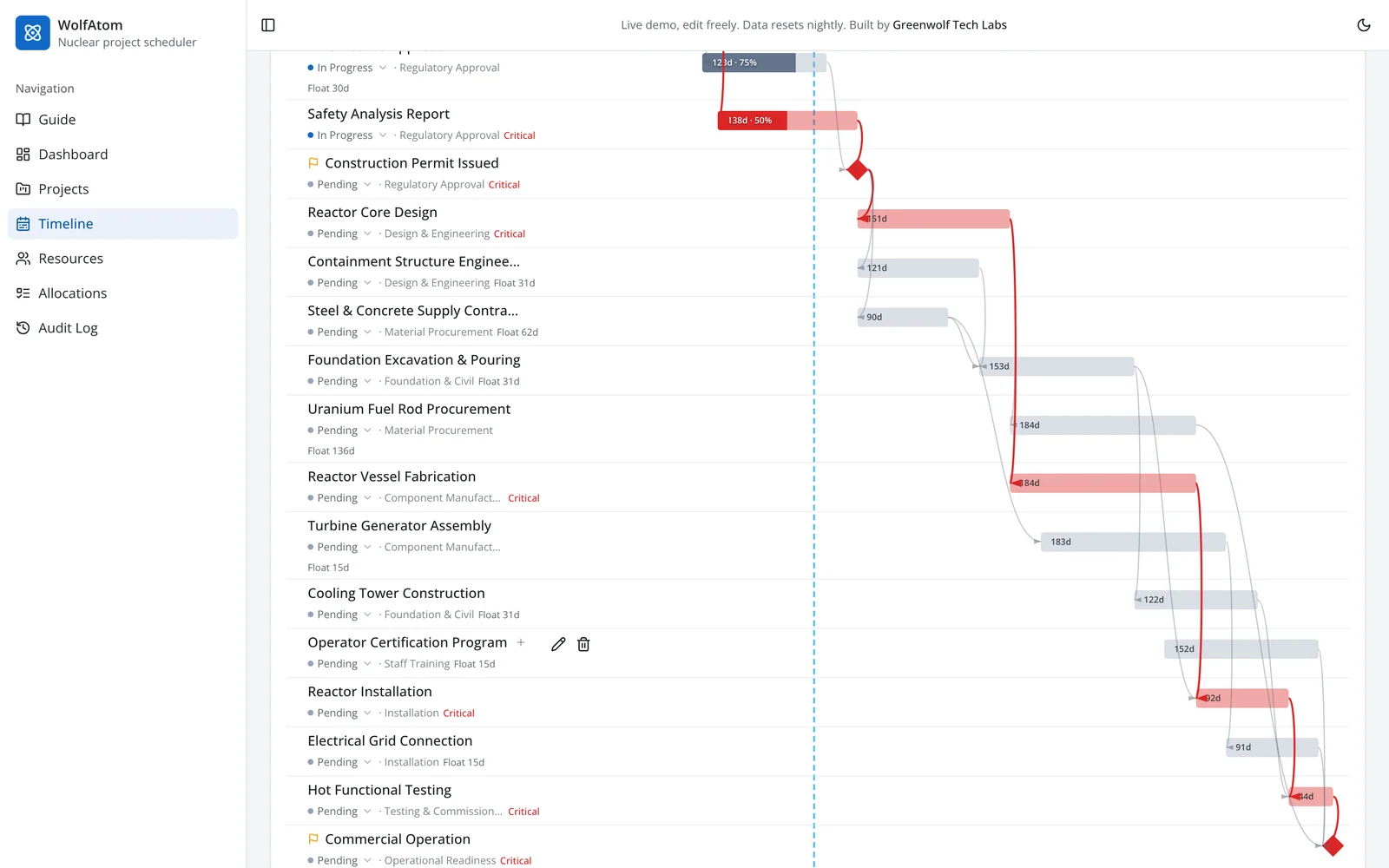
A full CPM forward and backward pass on every change. Critical activities light up red; everything else shows how many days it can slip.
Delay impact
Slip one activity and let the logic decide what moves. A delay inside float is absorbed; a delay on the critical path moves the finish, and the summary says by how much.
Schedule (F9) and baselines
Recalculate every date from the logic in one click, save the approved plan as a baseline and see each activity's variance in days.
Projects and templates
Every job on one screen with progress, finish against plan, labour budget, critical count and team. Start a new project from a template and its activities arrive already linked and fitted to your dates.
- Portfolio cards per project
- Templates for repeat work such as outages or SMR units
People and workload
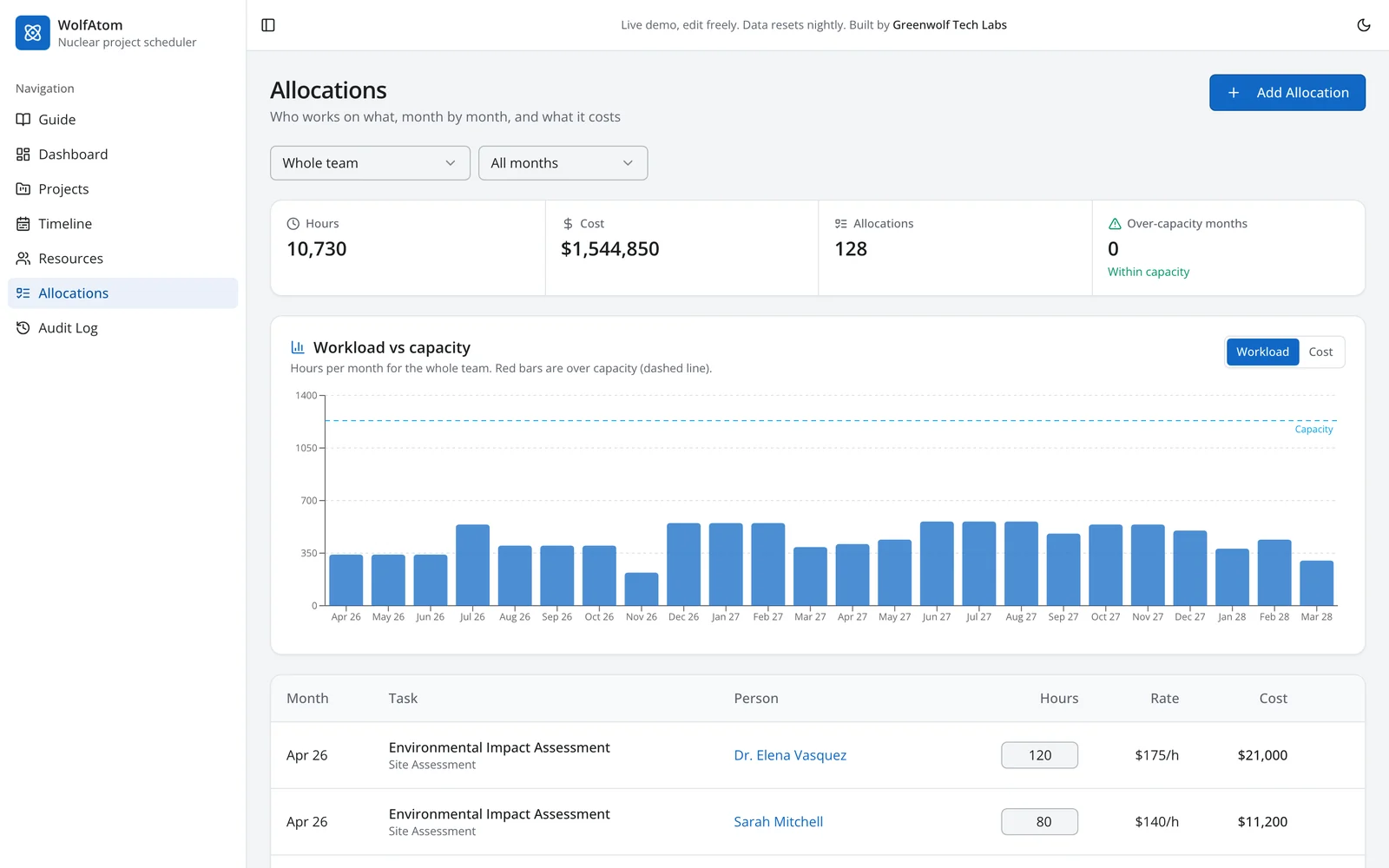
Monthly hours per person on each activity, cost from each person's rate, a histogram against capacity, and a shared-people list that flags anyone booked on several jobs at once.
Earned value dashboard
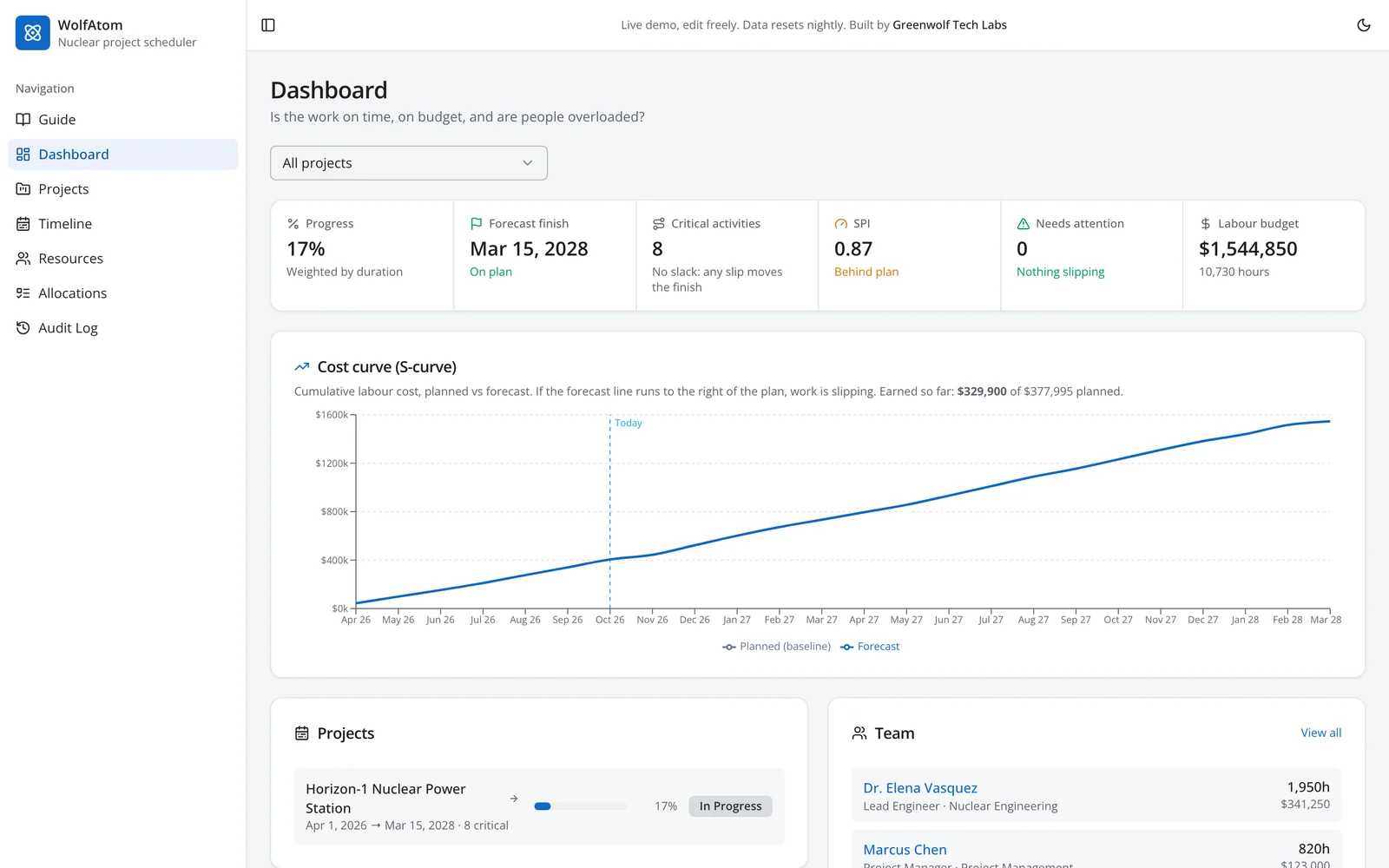
Progress, forecast finish, critical activities, SPI, labour budget and a planned versus forecast cost curve, for one project or all of them.
Exports and audit log
CSV with float, critical flag, baseline and variance for every activity, Gantt as PNG, and a log of every delay, reschedule and baseline.
04
See the critical path, the dashboard and the resource load
The critical path view below is the heart of any nuclear project management tool. In the demo, the safety analysis report and the construction permit drive reactor core design, which drives vessel fabrication, reactor installation, hot functional testing and commercial operation. A regulatory submission runs alongside with 30 days of float, so a 20-day slip there costs nothing, while a 14-day slip in the safety analysis report moves the forecast finish by 14 days. That difference is the whole point of CPM.
The dashboard turns the same schedule into the numbers a project director reports: duration-weighted progress, forecast finish against plan, the count of critical activities, SPI, labour budget and a cost S-curve. Pick one project or see all of them together. Nothing is typed in twice.
Resource loading closes the loop. The histogram compares monthly hours with capacity, so a schedule that looks fine on the Gantt but needs the same lead engineer in two places at once shows up in red.
05
Several projects, one team: the Projects view
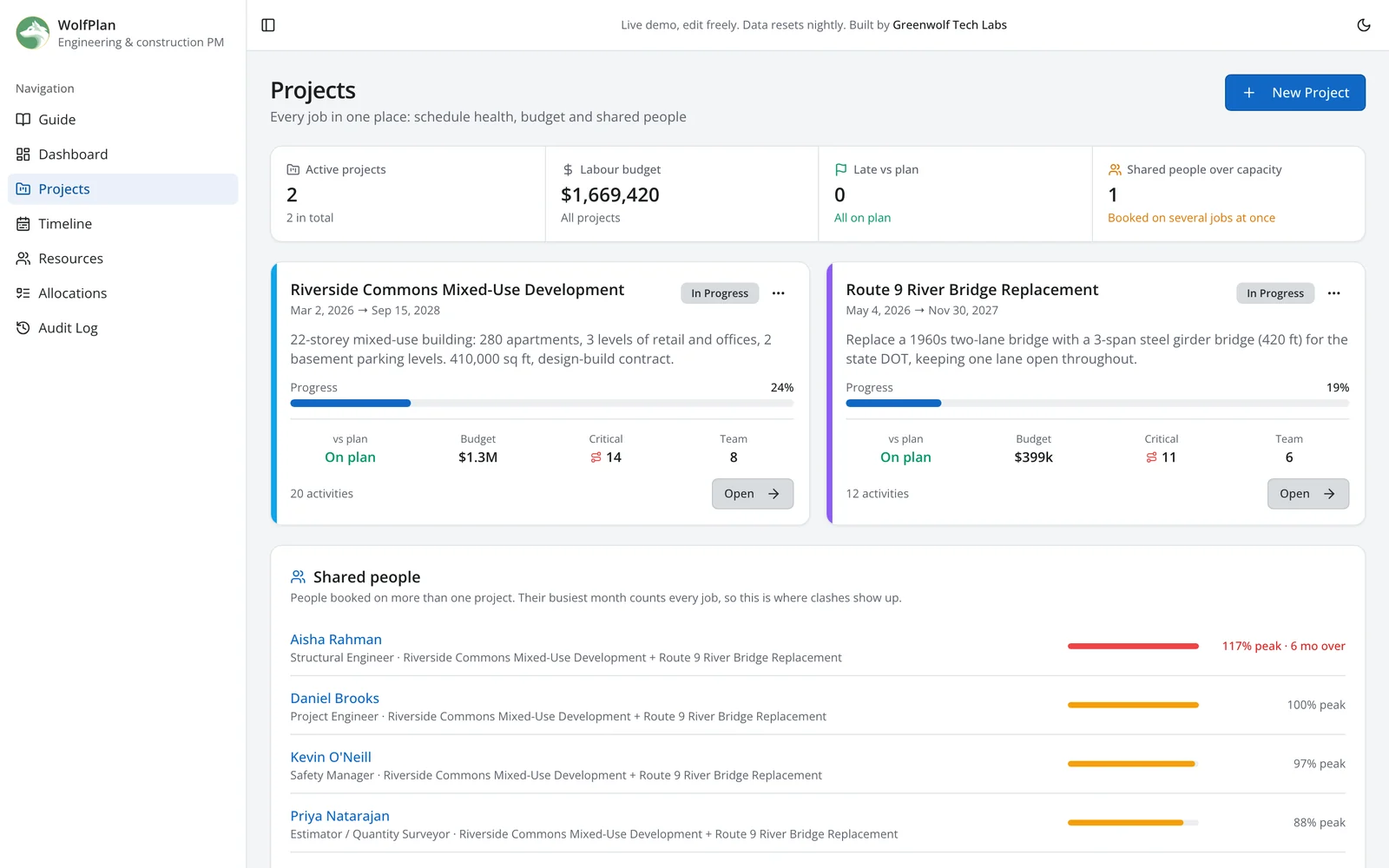
Nuclear organisations rarely run one job at a time. An owner may have an outage, a modification and a new build in flight, all drawing on the same engineers. The Projects view shows every job with its progress, finish against plan, labour budget, critical activity count and team, and lists the people booked on more than one job with their busiest month across all of them. That is where most resource clashes come from.
The example below is from WolfPlan, the construction edition, where one structural engineer is 117% loaded across a tower and a bridge. New projects start from templates, so a repeat outage or the next SMR unit arrives with its activities already linked and fitted to the dates you choose.
06
Where nuclear project scheduling software is used
New reactors and small modular reactor programmes
From site characterisation and approvals through procurement, civil works, module installation and commissioning. SMR programmes add factory fabrication and repeat deployment, so the schedule needs templates that can be reused from one unit to the next.
- Regulatory and permit milestones on the critical path
- Long-lead equipment tracked as activities
- Unit-to-unit templates for SMR fleets
Nuclear outage scheduling and outage management
Outage schedules run to the hour, with thousands of work orders and a fixed return-to-service target. The value is in seeing which jobs drive the critical path, levelling crews across shifts and updating the forecast as work closes.
- Critical path by shift
- Crew and contractor loading
- Outage templates reused every cycle
Major modifications and life extension
Steam generator replacements, digital I&C upgrades and power uprates combine engineering, procurement and outage work. The schedule has to connect the design package to the outage window it must land in.
- Engineering and procurement linked to outage dates
- Baseline and variance for each package
Decommissioning and waste programmes
Decommissioning runs for years with regulatory milestones, waste routes and funding profiles. Earned value and S-curves matter as much as the Gantt, because progress is reported against a fixed fund.
- Earned value against the funding profile
- Multi-year baselines
EPC contractors and nuclear suppliers
Suppliers and contractors need their own schedules that roll up into the owner's. A focused scheduler for fabrication, inspection and delivery is often more useful to them than a seat in the owner's enterprise system.
- Fabrication and inspection milestones
- Exports in the format the owner asks for
07
WolfAtom vs Primavera P6
Primavera P6 is the standard for large nuclear and energy programmes, and for good reason. A custom scheduler is not a replacement for P6 across a whole enterprise. It is a better fit when a team needs something focused, fast to use and connected to its own data. See our Primavera P6 pricing guide for what P6 costs.
| Primavera P6 | Custom scheduler (WolfAtom approach) | |
|---|---|---|
| Best for | Enterprise programmes with tens of thousands of activities and trained planners | A project, outage team, supplier or programme office that needs a focused tool |
| CPM, float, baselines | Yes, very deep | Yes, the core set |
| Multi-project and people | Enterprise portfolios and resource pools | Projects view, templates and shared-people clashes built in |
| Cost model | Per user licence or cloud subscription | One project fee; you own the code, no per-seat fee |
| Ease of use | Powerful, steep learning curve | Built around your team's workflow |
| Dashboards and integration | Through add-ons, analytics and APIs | Built in, connected to your ERP, CMMS or document system |
Many teams run both: P6 holds the master schedule, and a lighter tool or dashboard serves the people who update and read it. We can build that connection through P6's export files or its web services.
08
How we deliver a nuclear scheduling tool
Discovery
We map your schedules, users, reports and the systems the tool must connect to.
Configure on your data
WolfAtom is loaded with your WBS, activity codes, people, rates and calendars, or imported from an existing schedule export, with templates for the work you repeat.
Pilot one project or outage
Your planners use it on real work for a few weeks, and we change what does not fit.
Handover
User guide, test records and release notes. You own the code.
Hosting and support
Deployed in your cloud tenant, the region you choose or on your servers, with support and changes as your programme grows.
09
Not nuclear? The same scheduler for engineering and construction
The engine behind WolfAtom also runs WolfPlan, an engineering and construction edition with two live jobs that share one team: a 22-storey mixed-use development and a river bridge replacement. Try the WolfPlan demo, or read how the critical path method works step by step.
10
Nuclear project scheduling software questions
What is nuclear project scheduling software?
What is WolfAtom?
Can it replace Primavera P6?
Can it manage several projects that share the same people?
What is nuclear outage scheduling?
How does the software calculate the critical path?
Can it be hosted on our own servers?
Does it work for SMR projects?
How long does a pilot take?
Want WolfAtom on your project?
Tell us about your project, outage or programme. We will show WolfAtom on a call and outline what a pilot on your data would involve.
A reply from the engineer who built it, not a sales sequence.
Part of our Supply Chain and Procurement hub. Start with our supply chain automation.
Supply Chain and Procurement
More on supply chain automation
Critical Path Method Software: How CPM Scheduling Works and What to Use
What critical path method software does, a worked CPM example with forward pass, backward pass and float, schedule quality checks and how to choose a CPM tool.
Nuclear Supplier Identification and Qualification Support
Nuclear supply chain supplier identification: find NQA-1, 10 CFR 50 Appendix B and ASME N stamp suppliers, with qualification records kept current.
Primavera P6 Pricing in 2026: Licence, Cloud and Real Costs
Primavera P6 pricing from Oracle's own price lists: Professional, EPPM and cloud per-user costs, support, term licences, worked totals and cheaper alternatives.
Proof of Delivery Automation: Every Signed Slip Filed and Every Trip Billed the Same Day
Proof of delivery automation for transporters: drivers send the signed slip on WhatsApp, AI reads it, it is filed and the trip is invoiced the same day.
Purchase Order Follow Up for Manufacturers: Suppliers Chased Before Material Runs Late
Purchase order follow up for manufacturers: every open PO checked daily, suppliers asked for dates on WhatsApp and email, replies logged, delays flagged early.